Everything YOU need to post your map
If you are reading this then you are probably new to the site or you have completely forgotten how to post a map. I'm going to try and keep things very simple for you so you can understand things. First we are going to start with the rules.
Map Posting Rules
Threads must include at least one picture OR video that clearly demonstrates the map.
All pictures must be embedded.
Download links must lead to a posted map on the bungie forums, NOT your fileshare.
You must include at least a brief description of the map.
Thread titles must consist of the map name ONLY - no other symbols, comments or irregular formatting.
Now lets break things down
How to start making your thread
1. Click on the Maps forum
2. Decide which section your map belongs in. Competitive, MLG, Casual, Racing, Mini Games, or Aesthetic maps.
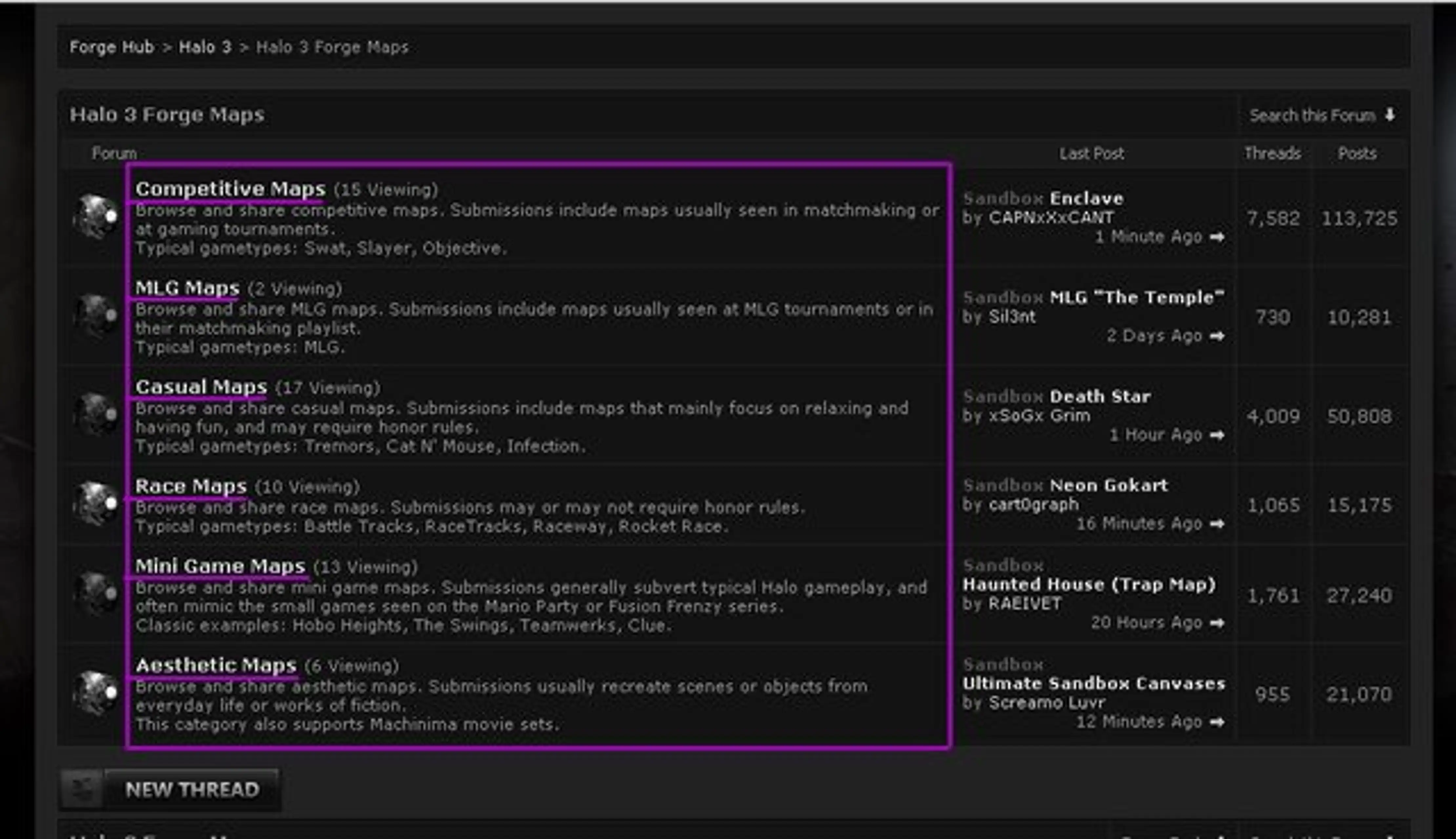
3. Click on the very noticeable 'New Thread' button.
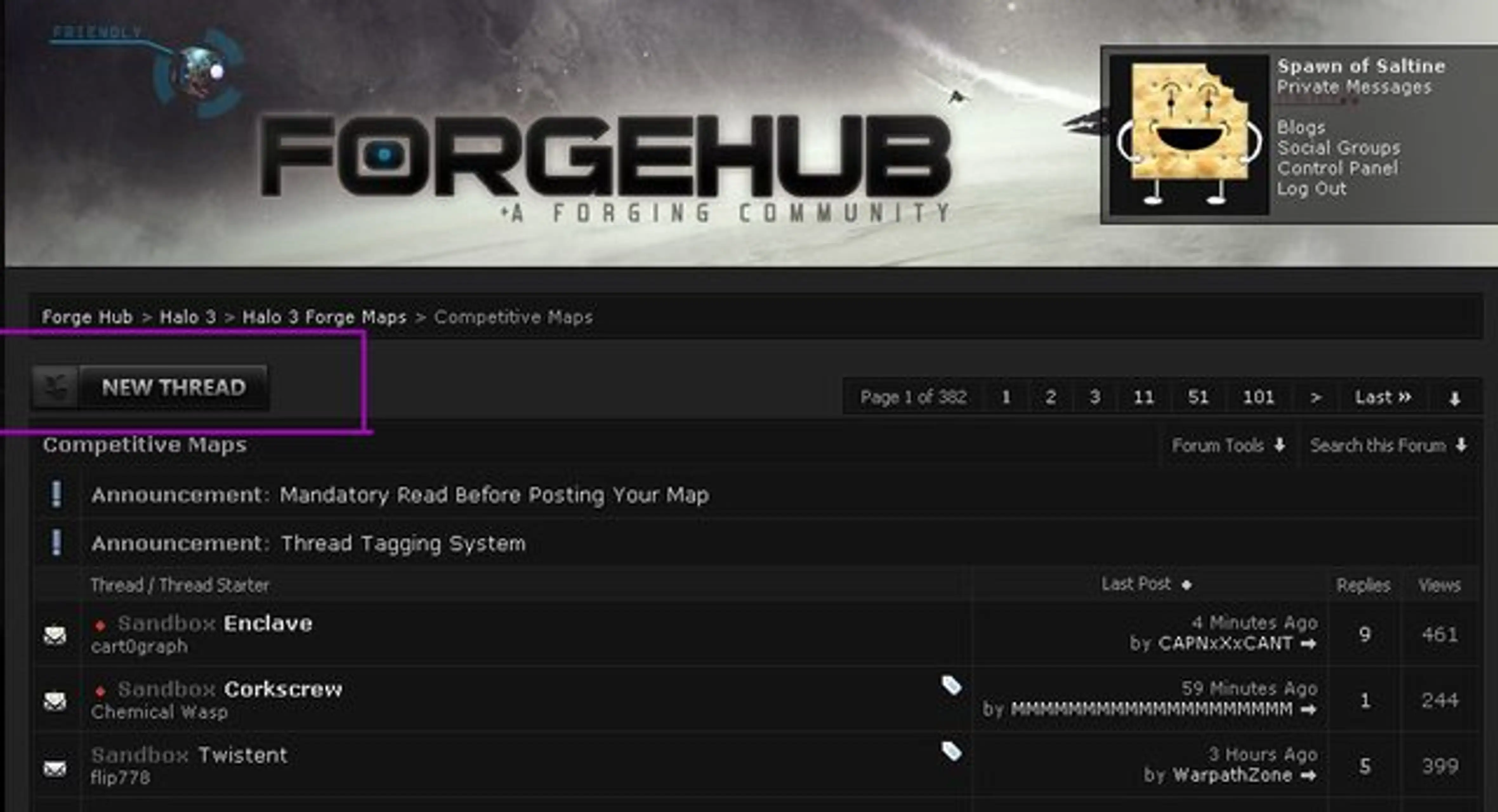
4. Now you are into the thread creation part..follow the rest of the guide.
1. Threads must include at least one picture OR video that clearly demonstrates the map.
2. All pictures must be embedded.
When you post your map it is nice to show people some pictures of what you made. Here is an easy to follow guide on how to get pictures on your thread.
Take some screenshots on Halo.
Go to your Bungie.net profile page then proceed to recent screenshots and save your pictures in high res.
Save the high res image(s) into a folder on your computer that you can navigate to quickly.
Go to Tinypic.com, browse images, and click upload, then type in the capctha code.
Copy the
Now we are going to get a little bit more in depth for each step.
Step 1-
Take screenshots on halo. Just boot up halo and go to theater mode. Take enough pictures so that people will get a good idea of what your map is all about. Save the pictures that you like and make sure you have enough room in your screenshots section (you have a limit of 50).
Step 2-
Goto:
Bungie.net : Halo 3 ScreenshotsProceed to your recent screenshots tab where all of the pictures you took in theater should be. Click on the 'View High Res' link. Now a pop up will appear and ask you where to save the image.
Step 3-
I like to save my screenshots in a designated “Forgehub Screenshots” folder. Try to at least save your pictures in a folder that is easily accessible. You can delete all of the screenshots in this folder once you are done with step 4.
Step 4-
Go to TinyPic - Free Image Hosting, Photo Sharing & Video Hosting. In the center of your screen you will see a “browse” button. Click on this and then locate the folder you saved your screenshots in. Choose the first picture you would like to upload and click open. Click on UPLOAD NOW. Type in the captcha and press UPLOAD NOW again.
Step 5-
Locate the IMG code and copy it. Go to your thread and paste the IMG code into it. When you submit your thread the image will show up.
NOTE: If you need to upload more than one picture into your thread then redo steps 4-5.
Thanks for following this easy guide! You should now have your pictures posted correctly.
Questions, comments, concerns?
Guide by Spawn of Saltine and B3NW.
3. Download links must lead to a posted map on the bungie forums, NOT your fileshare.
Now that we have Pictures up we need to give people a link to download the map.
How to get a nice and easy download link.
1. Type in _____(map name) Map Download.
2. Press return and type in ______(game type) Game type Download. Only do this if you have a custom game type for your map.
3. Go to Bungie.net
4. Log in and go to your file share.
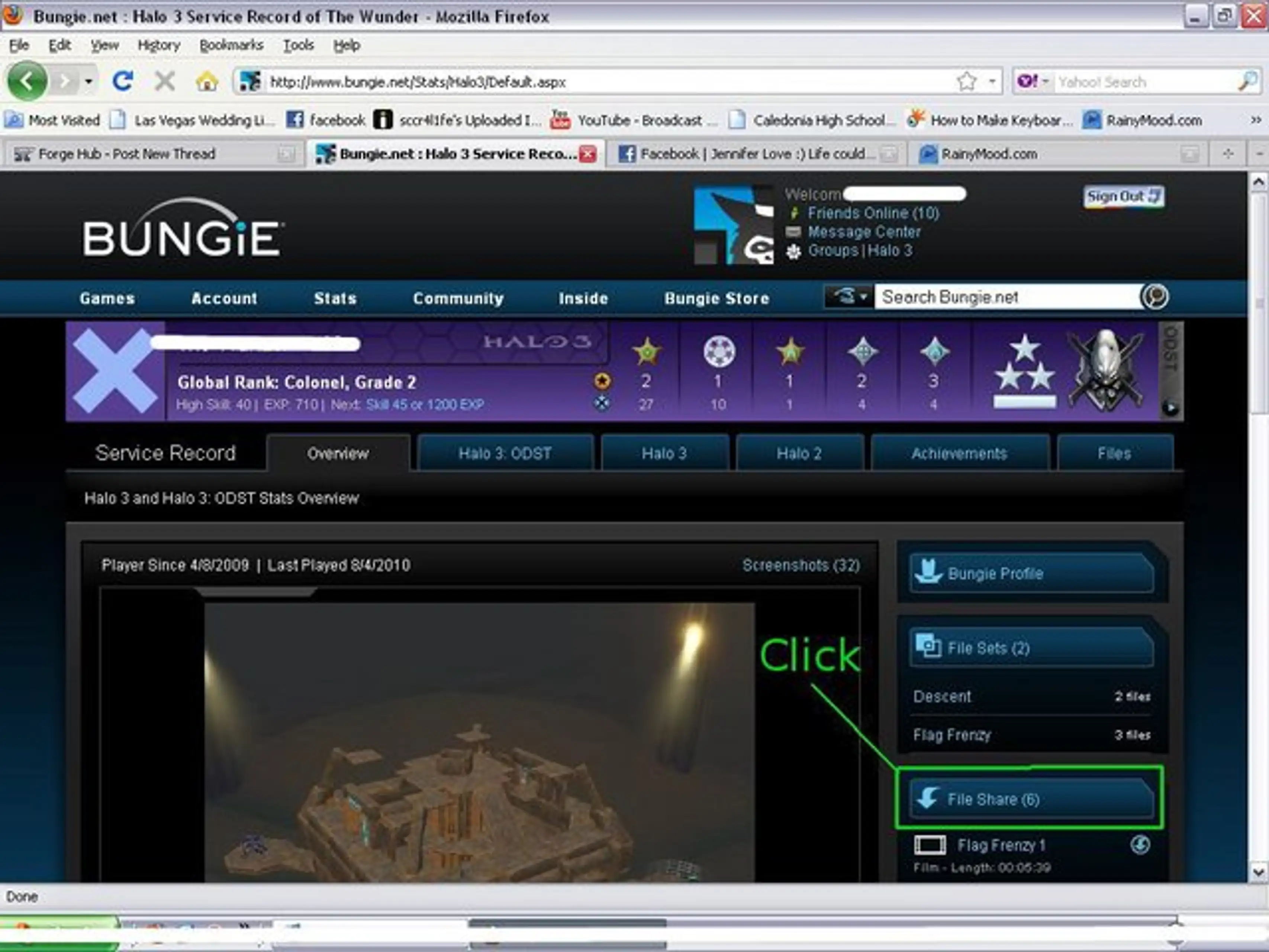
5. Click on your map title.
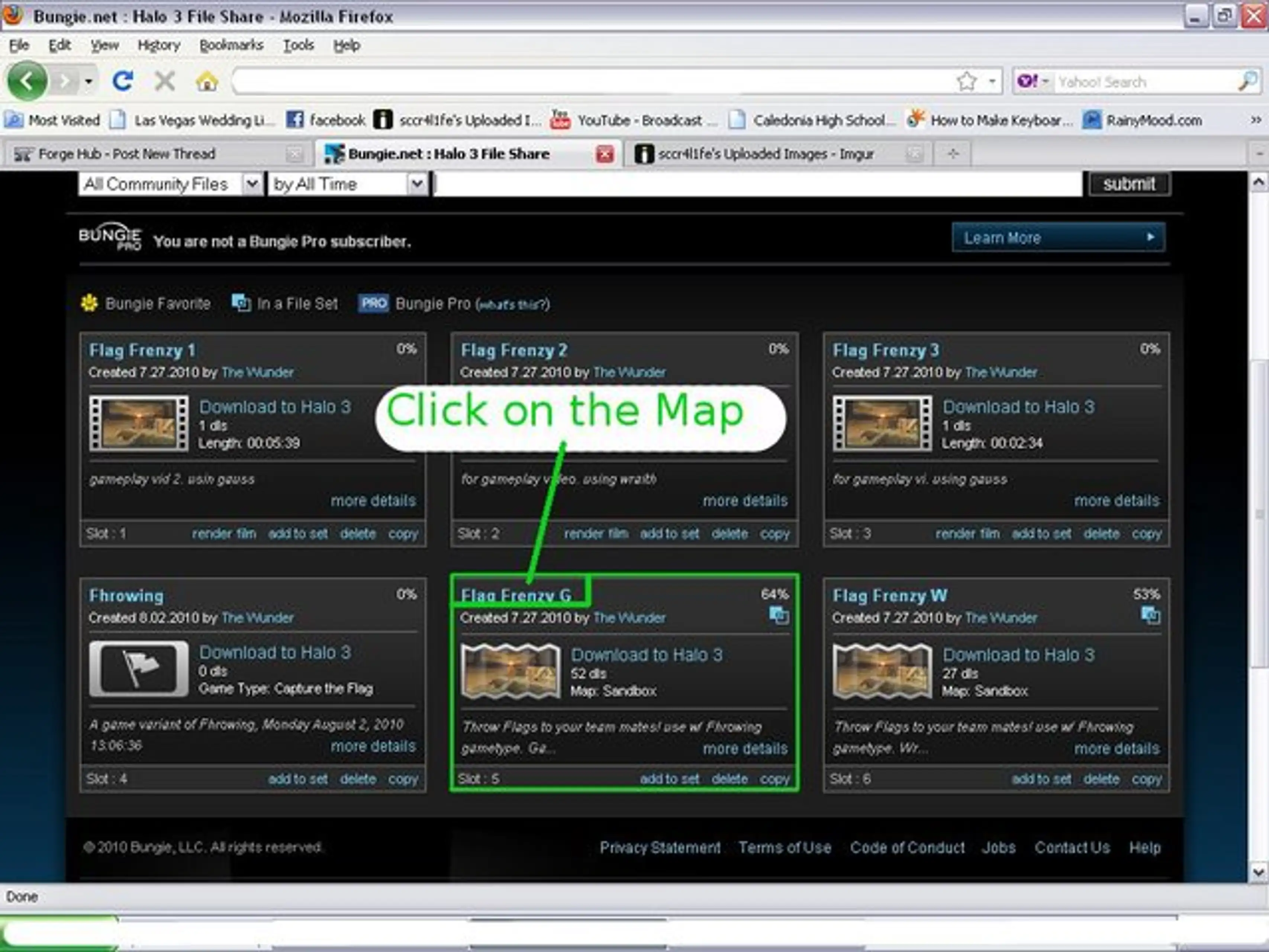
6. Highlight the URL and copy it.
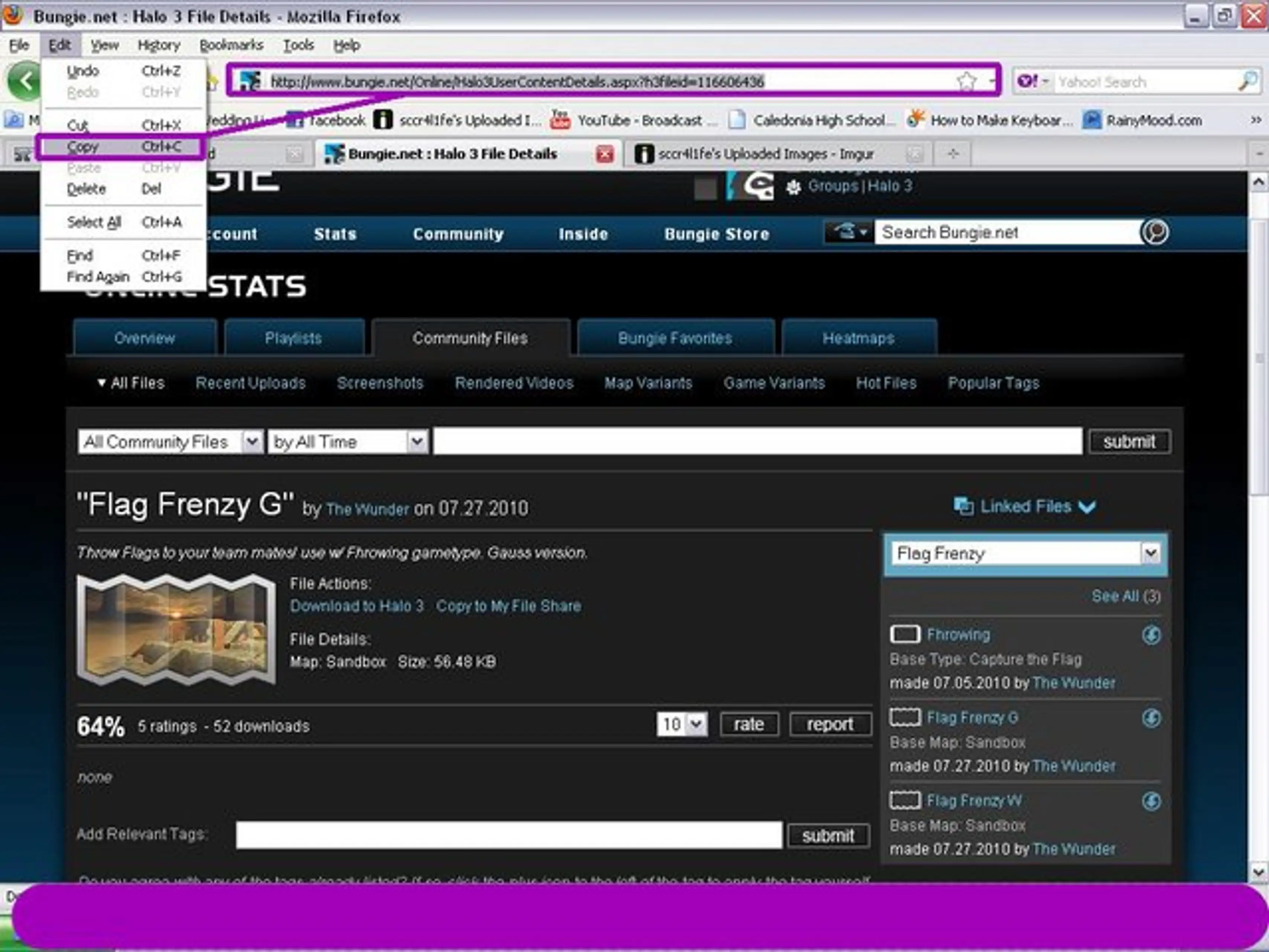
7. Return back to Step 1 and highlight "your map Map Download"
8. Click the hyperlink button on the toolbar and paste the URL.
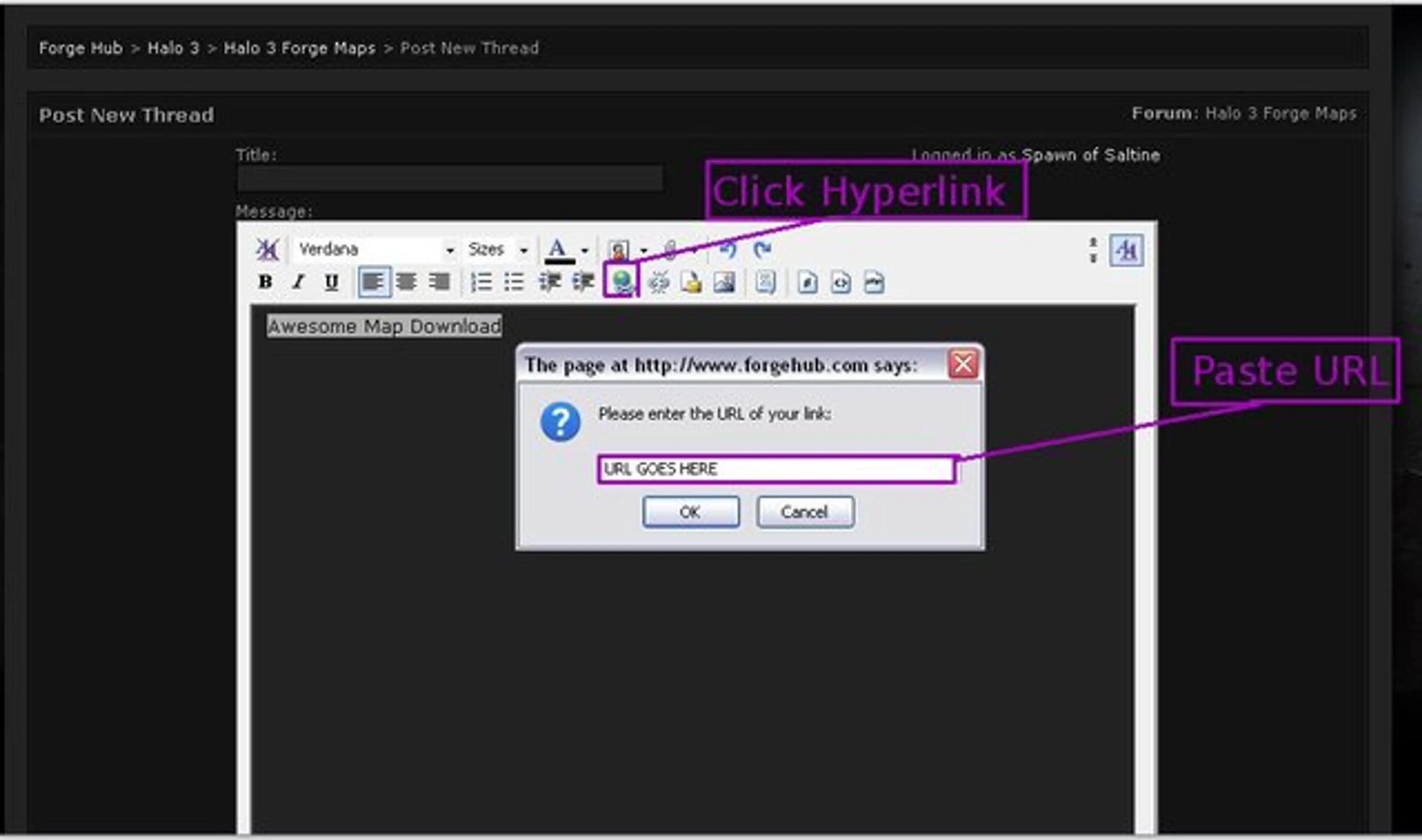
9. Press OK. Repeat Steps 4-9 for doing Game types.
10. ALL DONE!
4. You must include at least a brief description of the map.
This is very self explanatory. Tell the readers everything you can think of about the map. This could be the story behind the map, weapon layout, number of players that the map should be played with, or how to play the game. Try to use good spelling and grammar.
Here are some examples:
orThe Mantle is a Symmetrical Competitive map that is pretty small (about the size of Guardian or Blackout) Its mainly geared for 4-8 players, and features Slayer as it's primary gametype, Flag, Assault, Oddball, and Hill are all setup to work on here. It has a very unconventional flow to it, the top level reigns supreme over the bottom, but the bottom is the safer route, as it is more closed in, and the paths give a very unique feel to this map, its hard to explain though. It is requested to have BR starts and Radar on. This map has evolved so much from its original form, it used to have un-fun weapons, un-fun spawning, and un-fun gameplay. But I made some drastic layout changes, added fun weapons and got rid of the Seven respawn areas...don't ask, I'll address my failure later in the thread. But that's enough from me, I'll get to the pictures, I know some of you are getting impatient, or just skipped this text all together.
With Halo 3 coming to an end I present to you my last Halo 3 map, Dyad. Dyad is a symmetrical map with a slight asymmetric touch and features a unique and never before seen layout. With this map I wanted to test my creativity and forging skill so I decided to create this map by thinking how each piece I put down would effect gameplay. Dyad supports a game of up to 4v4 but plays 3v3 games of the gametypes team slayer, king of the hill, and team oddball best. Without further ado I present to you Dyad.
Weapon List
Battle Rifle x4 | 10 Seconds | 2 Clips
Carbine x2 | 30 Seconds | 2 Clips
Plasma Rifle x2 | 45 Seconds
Needler x2 | 60 Seconds | 2 Clips
Sniper Rifle x1 | 180 Seconds | 2 Clips
Rocket Launcher x1 | 150 Seconds | 0 Clips
Plasma Grenades x2 | 30 Seconds
Bubble Shield x2 | 150 Seconds
Overshield x1 | 180 Seconds
5. Thread titles must consist of the map name ONLY - no other symbols, comments or irregular formatting.
This is the easiest part of posting your map. Type in your map name and pick a prefix (if you choose to).
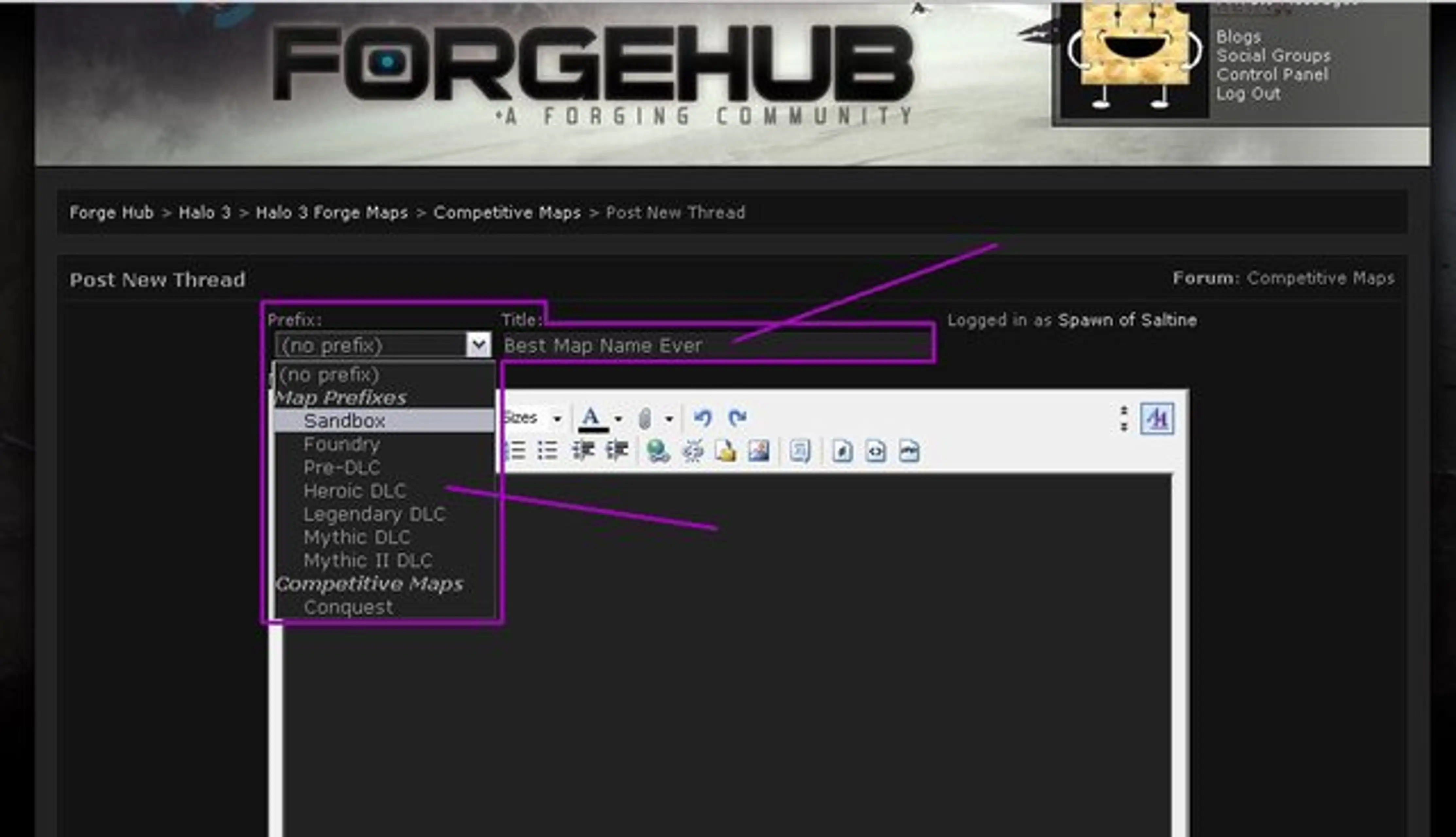
If you followed the guide correctly then you should have a pretty well constructed map post. Remember not to double post your maps! If you have any questions then feel free to ask me.
Here are some alternative threads that may interest you.
Original Thread by X5 to embed pictures.
B3NW's map post resources.
Shock Theta's Map Posting Template
BB Codes
Forum Rules
B3NW and Spawn of Saltine's Screenshot Guide
Thanks for Reading!