
Ever wanted a quick and easy way to post your map and make it look great?
Ever posted a map and forgotten something you should have included?
Ever been told your post wasn't up to standards?
Want your map to get more attention?
If you answered 'Yes' to any of the above questions, I urge you to read on!
Having a great looking post that follows ALL of Forge Hub's map posting guidelines will help your map stand out and attract more attention.
I put together some code for laying out a clear post that will abide by the Map Posting Rules of the site.
What you need to do:
Use the appropriate code depending on how many pictures you would like.
Copy the code from the code box into your new map topic.
Replace everything in CAPITALS AND UNDERSCORES with the information required (Tip: Double click on the text with underscores to quickly edit it while creating your post).
Paste code in the New Thread page when making a map thread (along with the additional map information).
Which one?
I have 1 picture to embed
I have 2 pictures to embed
I have 3 pictures to embed
I have 4 pictures to embed
I have 5 pictures to embed
I have 5+ pictures to embed
Once you have copied the correct code to your clipboard (Highlight code, Ctrl+C or Cmnd+C), you may use these links to post your map in the appropriate section of the Map Database:
Create New Thread in Reach Competitive Maps
Create New Thread in Reach MLG Maps
Create New Thread in Casual Maps
Create New Thread in Race Maps
Create New Thread in Mini Game Maps
Create New Thread in Aesthetic Maps
Create New Thread in Reach Gametypes
When you have opened one of the above links you will see a form to fill out.
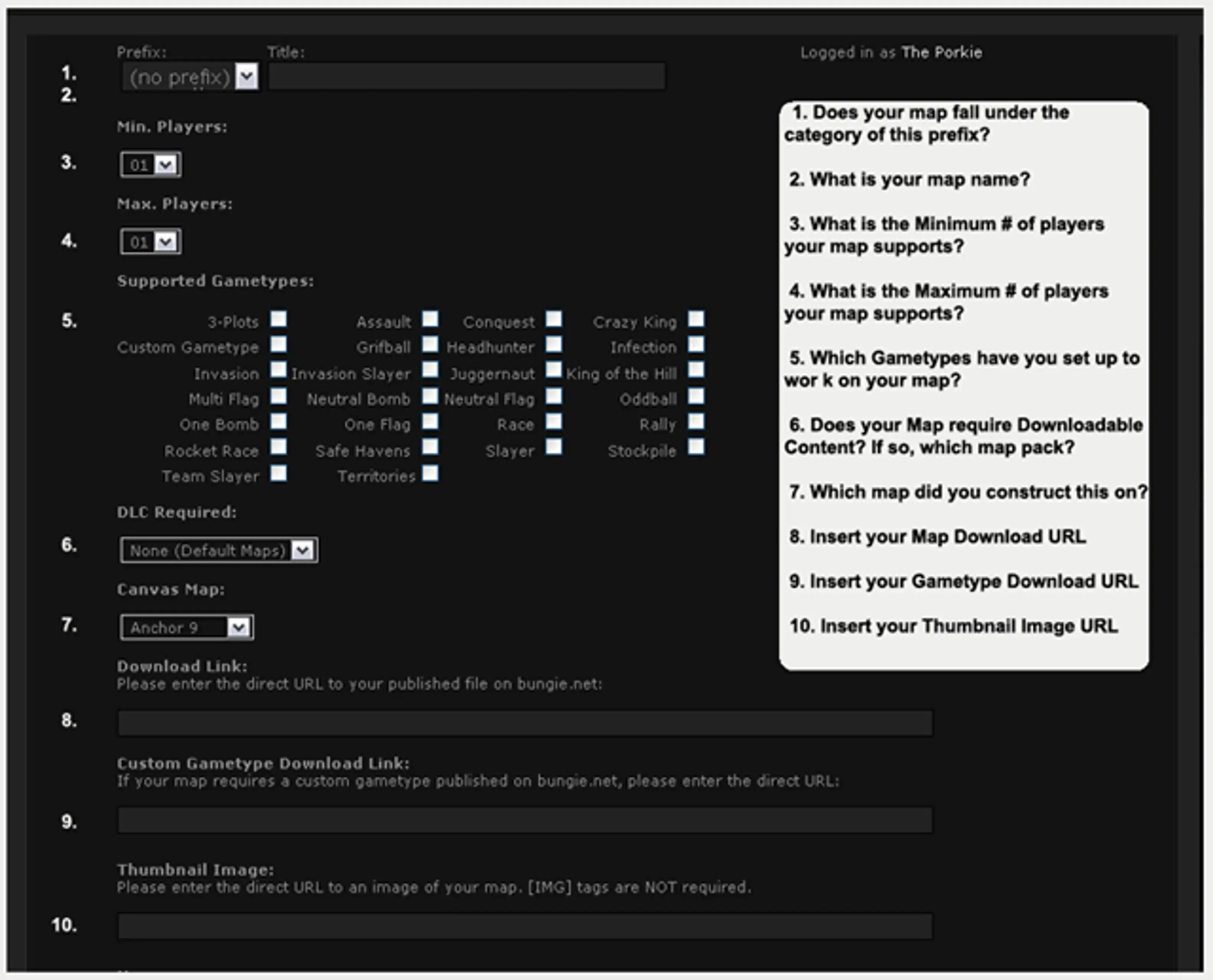
Fill in each blank and proceed to paste your appropriate copied code into the map thread.
Congratulations, you've prepared a successful map thread! But, just to be sure, click the Preview Post button (next to the Submit New Thread button). You can see what your code will look like before committing to making the thread, and if you are happy with the results, go ahead and click the Submit button to make your new thread.
If you would like to learn how to further embed pictures take a look at this thread.
Code for maps with 1 picture:
MAP_NAME_HERE

Created by YOUR_NAME_HERE

Map Description
DESCRIBE_YOUR_MAP_DESIGN,_LAYOUT_AND_ANYTHING_OF_INTEREST


BRIEF_DESCRIPTION_OF_FIRST_PICTURE_HERE
DIRECT_LINK_TO_HOSTED_FIRST_IMAGE_HERE


ADDITIONAL_SUMMING-UP_COMMENTS,_THANK_TESTERS,_AND_THANKS_FOR_ANYONE_GIVING_FEEDBACK_HERE
Back to Top
Code for maps with 2 pictures:
MAP_NAME_HERE

Created by YOUR_NAME_HERE

Map Description
DESCRIBE_YOUR_MAP_DESIGN,_LAYOUT_AND_ANYTHING_OF_INTEREST


BRIEF_DESCRIPTION_OF_FIRST_PICTURE_HERE
DIRECT_LINK_TO_HOSTED_FIRST_IMAGE_HERE

BRIEF_DESCRIPTION_OF_SECOND_PICTURE_HERE
DIRECT_LINK_TO_HOSTED_SECOND_IMAGE_HERE


ADDITIONAL_SUMMING-UP_COMMENTS,_THANK_TESTERS,_AND_THANKS_FOR_ANYONE_GIVING_FEEDBACK HERE
Back to Top
Code for maps with 3 pictures:
MAP_NAME_HERE

Created by YOUR_NAME_HERE

Map Description
DESCRIBE_YOUR_MAP DESIGN,_LAYOUT_AND_ANYTHING_OF_INTEREST


BRIEF_DESCRIPTION_OF_FIRST_PICTURE_HERE
DIRECT_LINK_TO_HOSTED_FIRST_IMAGE_HERE

BRIEF_DESCRIPTION_OF_SECOND_PICTURE_HERE
DIRECT_LINK_TO_HOSTED_SECOND_IMAGE_HERE

BRIEF_DESCRIPTION_OF_THIRD_PICTURE_HERE
DIRECT_LINK_TO_HOSTED_THIRD_IMAGE_HERE


ADDITIONAL_SUMMING-UP_COMMENTS,_THANK_TESTERS,_AND_THANKS_FOR_ANYONE_GIVING_FEEDBACK_HERE
Back to Top
Code for maps with 4 pictures:
MAP_NAME_HERE

Created by YOUR_NAME_HERE

Map Description
DESCRIBE_YOUR_MAP_DESIGN,_LAYOUT_AND_ANYTHING_OF_INTEREST


BRIEF_DESCRIPTION_OF_FIRST_PICTURE_HERE
DIRECT_LINK_TO_HOSTED_FIRST_IMAGE_HERE

BRIEF_DESCRIPTION_OF_SECOND_PICTURE_HERE
DIRECT_LINK_TO_HOSTED_SECOND_IMAGE_HERE

BRIEF_DESCRIPTION_OF THIRD_PICTURE_HERE
DIRECT_LINK_TO_HOSTED_THIRD_IMAGE_HERE

BRIEF_DESCRIPTION_OF_FOURTH_PICTURE_HERE
DIRECT_LINK_TO_HOSTED_FOURTH_IMAGE_HERE


ADDITIONAL_SUMMING-UP_COMMENTS,_THANK TESTERS,_AND_THANKS_FOR_ANYONE_GIVING_FEEDBACK_HERE
Back to Top
Code for maps with 5 pictures:
MAP_NAME_HERE

Created by YOUR_NAME_HERE

Map Description
DESCRIBE_YOUR_MAP_DESIGN,_LAYOUT_AND_ANYTHING_OF_INTEREST


BRIEF_DESCRIPTION_OF_FIRST_PICTURE_HERE
DIRECT_LINK_TO_HOSTED_FIRST_IMAGE_HERE

BRIEF_DESCRIPTION_OF_SECOND_PICTURE_HERE
DIRECT_LINK_TO_HOSTED_SECOND_IMAGE_HERE

BRIEF_DESCRIPTION_OF_THIRD_PICTURE_HERE
DIRECT_LINK_TO_HOSTED_THIRD_IMAGE_HERE

BRIEF_DESCRIPTION_OF_FOURTH_PICTURE_HERE
DIRECT_LINK_TO_HOSTED_FOURTH_IMAGE_HERE

BRIEF_DESCRIPTION_OF_FIFTH_PICTURE_HERE
DIRECT_LINK_TO_HOSTED_FIFTH_IMAGE_HERE


ADDITIONAL_SUMMING-UP_COMMENTS,_THANK_TESTERS,_AND_THANKS_FOR_ANYONE_GIVING_FEEDBACK_HERE
Back to Top
Code for maps with 5+ pictures:
MAP_NAME_HERE

Created by YOUR_NAME_HERE

Map Description
DESCRIBE_YOUR_MAP_DESIGN,_LAYOUT_AND_ANYTHING_OF_INTEREST


BRIEF_DESCRIPTION_OF_FIRST_PICTURE_HERE
DIRECT_LINK_TO_HOSTED_FIRST_IMAGE_HERE

BRIEF_DESCRIPTION_OF_SECOND_PICTURE_HERE
DIRECT_LINK_TO_HOSTED_SECOND_IMAGE_HERE

BRIEF_DESCRIPTION_OF_THIRD_PICTURE_HERE
DIRECT_LINK_TO_HOSTED_THIRD_IMAGE_HERE

BRIEF_DESCRIPTION_OF _FOURTH_PICTURE_HERE
DIRECT_LINK_TO_HOSTED_FOURTH_IMAGE_HERE

BRIEF_DESCRIPTION_OF_FIFTH_PICTURE_HERE
DIRECT_LINK_TO_HOSTED_FIFTH_IMAGE_HERE

▼ Copy and Paste for every additional picture ▼

BRIEF_DESCRIPTION_OF_FIFTH_PICTURE_HERE DIRECT_LINK_TO_HOSTED_FIFTH_IMAGE_HERE


ADDITIONAL_SUMMING-UP_COMMENTS,_THANK_TESTERS,_AND_THANKS_FOR_ANYONE_GIVING_FEEDBACK_HERE
Back to Top
Hope you all found this easy and understandable to use!
Special thanks to Reflex Ion, Black Theorem, and Shock Theta for helping me compile this.
Questions? Comments? Be sure to leave posts here if you need help with anything related to using the code provided here!